Showing posts with label words. Show all posts

Adobe Photoshop CC- Not exactly an early adopter...

Its a words post! Where is the code? That comes later... for now, words. I'm now an official owner (or at least subscriber) of/to Adobe CC... yeah, I got through my whining stage and now I'm learning to love the cloud, or, at least learning how to accept the inevitable.
Long live the cloud! I guess.

But from the Photoshop tool development perspective I think I actually find it a little more exciting than I am letting on. You mean *everyone* will be on a standard version? No kidding! What an awesome development! No more hacking in (sometimes) seeming random version numbers! The ability to assume everything you want to support is supported. Great! Don't have the right version? Update your Photoshop buddy!

When taken from that perspective I really think that Adobe's decision (aside from the whole aspect of never actually 'owning' the software) is a pretty great one. Maintaining pipelines for multiple versions of Photoshop ceases to be a major problem*, and tool development and distribution becomes, if not simpler, at least a little more direct in execution. 

I'm also taking my first steps into the Photoshop SDK, which is an incredibly powerful and daunting piece of architecture. Not only does it require C++ for creating plug-ins, but it also seems to be half way between a development framework and a history lesson on ye early days of Photoshop. And the documentation? Reading through it, there seems to be a big Photoshop SDK tutorial shaped hole where the SDK tutorials ought to be. 

But, if it were easy, it wouldn't be as fun! Now to work through that hello world tutorial...


* Currently supporting four different versions at work and trying very hard not to.  
Unity4.3 Released

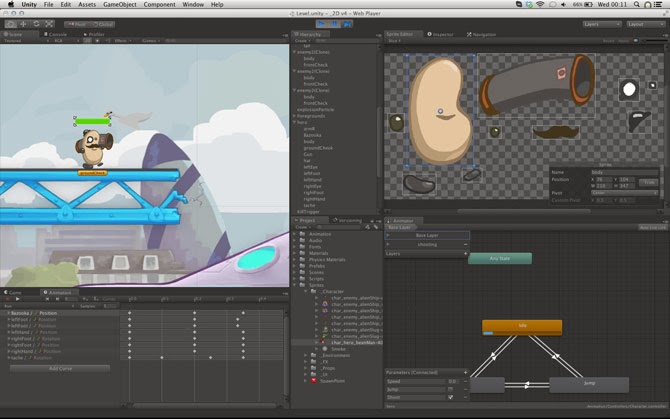
Unity 4.3 has just been released! As a Unity Developer this is awesome news, especially with the new native 2d toolkit that has been included with this release.

The new 2d tools... spritey goodness. 

We have been using the Unikron Software 2d toolkit for all of our sprites in game so far, and it is a pretty well fleshed out package, although a little cumbersome to use. I'm very interested to see how the new native 2d toolkit performs on mobile devices, and if it does perform well, what kind of workflow enhancements it will provide.


California!

A week ago my wife and I bid farewell to the land of Kangaroos, Koalas and drop-bears* and made our way  to sunny California, where people drive on the right side of the road and everybody is in the movie business**. 

Now to find a job! 

* Koalas that don't know how to hold onto a gum-tree and sleep at the same time are colloquially known as drop-bears. 
**Apparently. 

Rise of the Guardians- The Video Game

So... this is what I have been working on since leaving Bluetongue Entertainment in 2011:

KitchenSinkCube SKU coming soon...

Rise of the Guardians is finally out in North America on pretty much any platform you want. Almost any platform anyway. I was one of two level artists for the duration of the project, and I've updated my portfolio website with screenshots of some of my work. 

The game is based closely on the environs of the Dreamworks movie of the same name. In all there were roughly 35 levels that had to be created for the final game which meant that the turn around for each of them was pretty rapid. My favorite level to work on was the snowy Yeti Village. There is something really fun about making ramshackle bridges across deadly, deadly ravines:

The Yeti Village level from Rise Of the Guardians The Video Game.
The game was developed by Torus Games and published by D3Publisher. 


Creating and Removing Virtual Drives

Its Friday morning, the weekend is sparkling in front of you and you boot up your work computer only to find that something in the system has hiccuped and nuked all your virtual drive settings.

Even if you don't have an environment batch file or what have you to save the day, it's an easy fix (as long as you know what the virtual drives were linking to!)


Creating a Virtual Drive:


1-Work out what folder you want the drive to link to- eg: c:\projects\myProject\art\
2-Open the command prompt
3-Type in:

subst z: c:\projects\myProject\art\

Presto! z: now links directly to that folder! You can use any drive letter as an assignment as long as it is not currently in use by the system. Good candidates are x:, y: and z: drive letters.

Removing Virtual drives...

Oops... I made a mistake in my path and now it links to c:\whoops\this\is\wrong, and when I try to fix it it keep telling me 'Drive already SUBSTed'

Once again, easy fix! To remove a virtual drive after it has been made, type this into the command prompt...

subst z: /d

And your virtual drive will be removed. This won't delete the data in the drive, just the link to the drive itself. Now z: is free to be linked to the correct folder.

-Pete

Words.

Moving house is a pain, but its almost over, and I now have Internet. My ping might be 1576ms and the speed at something like 0.05Mbps but it's Internet 'damnnit!

I've decided to go low(high?)tech and rather than setting up my usual cable broadband I've invested in a 3G mobile-broadband USB stick. So far I'm not totally impressed, but being able to browse the internet on the train is kinda cool. Even if it is at speeds approaching ye-olde dial-up from the wrong side.

The sales team promised me "Something kinda around ADSL1 speeds" with emphasis on the something and the kinda. Those awkward pauses during the sales pitch are starting to make sense now...

Anyway, talking of the internet, if anyone is interested in making their Python scripts talk to the web (or at least read the web) I totally recommend checking out the built in urllib2 and the beautifulsoup modules. I've started poking around with them and writing some screen-scraping scripts and so far it is a lot of fun.

-Pete